
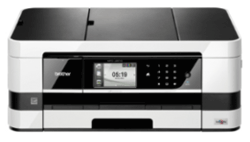
Brother MFC-J2510 Wireless A3 All-in-One Printer
Availability: Phased Out

Pay only P 2,825 a Month for 6 months.
Or pay only P 1,511 a Month for 12 months.
- 0% interest promo is available for locally issued credit cards
- Card holder must transact inside an Asianic store to avail of the 0% promo
Features
Sleek & Compact Design
MFC-J2510 InkBenefit's one of a kind landscape printing technology allows for a sleek and space-saving device with depth of just 290mm.


A3 Printing Capability
It supports business need for high impact documents with occasional A3 printing via manual paper feed, while letting you enjoy compactness of machine
Improve Productivity and Save Time
Featuring high print speeds of 20/18ppm*, time is saved when
there are multiple users or large volume printing tasks. Users
can utilise their time more efficiently instead of waiting for
their printouts.


Enjoy Lower Running Costs
MFC-J2510 InkBenefit offers options of high-yield and super high-yield ink cartridges, allowing users to effectively reduce total operating costs and lower overall cost per print. Moreover, users reduce paper and ink wastage with Brother's duplex (two-sided) printing. Plus, easily produce 2-up and 4-up on a single sheet. This saves paper when viewing drafts or layouts.
Intuitive User Interface
3.7” Wide Touchscreen with slide touch and animation allows users to swipe, touch and type to access various features.


Convenient Scanning of Multi-Page Documents
The Automatic Document Feeder (ADF) allows unattended scanning, copying and faxing of multi-page documents quickly and easily, complementing our MFC's stack and sort capabilities for added convenience.
Direct Printing Without a Computer
The direct print feature enables users to print files such as JPEG or printer-ready documents without even using your computer! Print directly from a USB flash memory drive, media cards or PictBridgeTM compatible digital cameras by simply connecting them to the MFC.


Eliminate Printing of Junk Faxes
The PC Fax receiving function boasts a junk fax filter that eliminates the printing of unnecessary faxes by scanning documents directly to your computer instead of printing them out indiscruminately, thereby cutting down on paper and toner wastage.

Apple-Compatible Printing and Scanning
With the free iPrint&Scan app, you can now print directly from your iPhone, iPod Touch, iPad or Android Smartphones. Plus, you can scan documents from your MFC straight to your Apple gadgets or Android Smartphones.
Technical Specifications
| Technology | Inkjet |
| Memory | 128 MB |
| Display | 3.7" Wide Touchscreen Colour LCD with slide touch & animation |
| Interface | USB 2.0 Hi-Speed , USB Direct Print, PictBridge™, Media Cards, LAN, Wireless LAN |
| Print Speed | Up to 35 (Monochrome) / 27 (Colour) ppm (Based on Fast Mode) Up to 20 (Monochrome) / 18 (Colour) ppm (Based on ISO/IEC 24734) |
| Print Resolution | Up to 1,200 x 6,000 dpi (Horizontal x Vertical) |
| Duplex (2-sided) Print | Automatic 2-sided print/copy up to A4 size |
| Ink Save Mode | Yes |
| Enlargement / Reduction | 25% - 400% in 1% increments |
| Copy Resolution | Up to 1,200 x 1,200 dpi (mono and colour) |
| N-in-1 Function | Compress 2 or 4 pages onto a single sheet, Including ID Copy |
| Modem Speed | 33.6 Kbps Super G3 |
| Transmission Speed | Approximately 3 seconds |
| Fax/Tel Switch | Automatic recognition of fax and telephone reception |
| Speed Dials | 100x2 numbers + 50 locations |
| Group Dials | Up to 6 groups |
| Auto Reduction | Yes |
| Memory Transmission | Up to 200 pages |
| Fax Forwarding | Yes (B&W Only) |
| Fax Retrieval | Yes (B&W Only) |
| Out-of-Paper Reception | Up to 200 pages |
| Dual Access | Yes (B&W Only) |
| Protocols | ARP, RARP, BOOTP, DHCP, APIPA(Auto IP), WINS/NetBIOS name resolution, DNS Resolver, mDNS, LLMNR responder, LPR/LPD, Custom Raw Port/Port9100, IPP, FTP Client and Server, SNMPv1/v2c, TFTP server, SMTP Client, APOP, POP before SMTP, SMTP-AUTH, ICMP, Web Services (Print/Scan), CIFS Client, SNTP Client |
| Power Consumption | Measured when the machine is connected to the USB interface. Power
consumption varies slightly depending on the usage environment or part
wear. Copying Mode: Approx. 21W Ready Mode: Approx. 5.5W Sleep Mode: Approx. 1.5W Off: Approx 0.04W |
| Ecology | EnergyStar |
| Paper Input (Standard Tray) | Up to 150-sheets |
| Multi-Purpose Tray / Manual Slot | Single sheet manual feed |
| Automatic Document Feed (ADF) | 20-sheets |
| Paper Handling Sizes | A4, A5, A6, Exe, LTR, Photo 4X6" (102X152mm), Index Card (127x203mm), Photo-2L (127x178mm), Com-10, DL Envelope, Monarch, Photo-L (89x127mm), A3 (Manual Feed), LGR (Manual Feed), C5 (Manual Feed), LGL (Manual Feed) |
| Paper Output | Up to 50-sheets |
| Sending | Yes |
| Receiving | Yes (Windows® only) |
| Scanning Capability | Colour & Monochrome |
| Optical Scanning Resolution | Up to 2,400 x 2,400 dpi |
| Interpolated Scanning Resolution | Up to 19,200 x 19,200 dpi |
| Scan to Feature | Duplex Scan, FTP, E-mail, Image, File, USB, Media Cards, USB Flash Memory Drive, USB Flash Memory, Optical Character Recognition, Network (for Windows® Only), E-Mail Server |
| Booklet Printing | Yes |
| Poster Printing | Yes |
| Watermark Printing | Yes |
| Copy Enhancement | Yes |
| Secure Function Lock | Yes |
| Printer Driver (Windows) | Windows® XP Home Edition, XP Professional Edition, XP Professional x64 Edition, Windows® Vista, Windows® 7, Windows® 7 64 bit, Windows® Server 2003 , Windows® Server 2003 x64 Edition, Windows® Server 2008 |
| Printer Driver (Macintosh) | Mac OS® X 10.5.8, 10.6.x and 10.7.x |
| Network Management Tool | BRAdmin Professional 3 - Brother original Windows utility for printer and print server management, BRAdmin Light - Printer and print server management operates under Windows and Macintosh, Deployment Wizard - Drivers with customized settings can be installed by the user with the click of a mouse button rather than someone in IT having to manually configure every PC in the office. |
| Dimension (W x D x H) | 480 (W) x 290 (D) x 186(H) mm |
| Weight | 9.3 Kg |
| Warranty | 12 months Carry-in Warranty NOTE: The warranty period for this equipment covers at least a minimum of 12 months from the date of registered purchase. It will only be extended for another 12 months if the consumer fills-up and sends the extended warranty application form to Brother Philippines. |