
Sunday, 05 April 2026
Wacom Intuos3 12 x 19 Professional Tablet
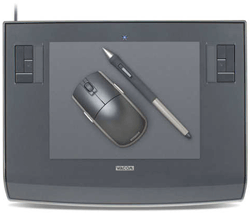
Wacom Intuos3 12 x 19 Professional Tablet
The Intuos3 professional pen tablet makes it easy to quickly and professionally edit photos and create digital artwork. The Intuos pen tablet comes in six different sizes: 4x6, 6x8, 6x11, 9x12, 12x19, 12x12. The 16:10 aspect ratio allows you to accurately reach every point on your widescreen display while taking up the least amount of desk space.Availability: Phased Out

Pay only P 3,166 a Month for 12 months.
Or pay only P 6,332 a Month for 6 months.
- 0% interest promo is available for locally issued credit cards
- Card holder must transact inside an Asianic store to avail of the 0% promo
features
Easy to use. It's easy to use a pen tablet because every point on the tablet has a matching point on the screen. When you move your pen over the tablet, the cursor moves in precisely the same way on the screen. Where you touch your pen tip to the tablet is where you click.Pressure sensitivity. With 1,024 levels of pressure sensitivity, you can control your software tools by changing how hard you press the pen tip on the tablet. Using pressure sensitivity, you can dynamically control things like exposure, brush size, opacity, and more.
Intuos3 Pen Tablet. The sloping, contoured palm rest provides comfort while you work. Adjust your cord position vertically or horizontally for greater workspace flexibility. The eight-foot cable allows you to kick back while you work.
ExpressKeys™ Strategically placed programmable ExpressKeys are “chordable” and can be used for mouse clicks, modifier keys, open/run applications, pop-up menus, and keyboard shortcuts.
Touch Strips. Finger-sensitive Touch Strips allow you to quickly scroll, zoom, change brush size, and more.
Intuos3 Grip pen. With 1,024 levels of tip and eraser pressure sensitivity, the Intuos3 Grip Pen fits comfortably in your hand with a cushioned and contoured grip for a natural feel. The pen has a programmable DuoSwith™ and tilt sensitivity. It also comes with multiple nibs for a variety of “feels.” Keep your pen handy in the included multi-position pen stand.
Intuos3 five-button mouse. The Intuos3 five-button mouse is ball-free and optics-free for smooth, accurate tracking. It's ambidextrous low-profile design gives you just the right feel. Five programmable buttons and a fingerwheel give you added flexibility and control.
Intuos3 Driver. Tablet driver software allows you to create universal settings for your pen and tablet or alter your settings by application for maximum productivity. An intuitive interface gives you detailed control so you can work exactly the way you want, personalize the way your pen feels, access your favorite keystroke combinations or optimize your work environment with flexible mapping.
USB connection. Quick installation to your computer with USB connectivity.
Technology. Patented cordless, battery-free technology for a natural feel and superior performance.
Technical Specifications:
| Bamboo | Bamboo Fun | Intuos3 | |
| ExpressKeys | 4 | 4 | 8 (4 on the 4x6) |
| Finger-Sensitive Input | 1 Touch Ring | 1 Touch Ring | 2 Touch Strips (1 on the 4x6) |
| Pressure Sensitivity | 512 levels Pen only |
512 levels Pen & Eraser |
1,024 levels Pen & Eraser |
| Pen Tilt | No | No | Yes |
| Display Toggle | No | No | Yes |
| Application-Specific Settings | No | No | Yes |
| Sizes Available | Small | Small Medium |
4x6, 6x8, 6x11 9x12, 12x12, 12x19 |
| Tablet Colors | Black | Black, Silver, White, Blue | Metallic Gray and Satin Gray |
| Mouse | No | Yes | Yes |
| Included Software | None |
|
|
| Wide Screen | Yes | Yes | Yes (4x6, 6x11, 12x19) |
| Alternate Pens Available | No | No | Yes |
| Cable Length | 5 feet | 5 feet | 8 feet |
| Resolution (lines per inch) | 2,540 | 2,540 | 5,080 |