
Brother MFC-J265W All-in-One with Fax Printer
Availability: Phased Out

Pay only P 560 a Month for 12 months.
Or pay only P 1,061 a Month for 6 months.
- Installment promo is available for locally issued credit cards
- Card holder must transact inside an Asianic store to avail of the installment
Features


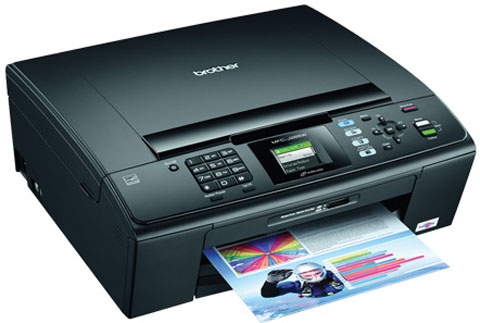
Do More with the MFC-J265W - with Print, Scan, Copy and Fax capabilities combined with wireless network and 1.9” colour LCD display in one compact and stylish machine. Share the MFC-J265W amongst multiple users without the need for untidy cables, with the built-in wireless network. It is easy to connect and safe to use with the simple to follow, secure software. Use the 1.9” colour LCD display to access Print, Scan, Copy and Fax settings on the easy to navigate menu system. Also preview images before printing directly from your Pictbridge port and media card without the need to turn on your PC. Scan or copy bound and irregular shaped documents on the flatbed scanner. Enhanced scanning features also allow you to save time by scanning directly to scanning directly tofile, email or memory card.

Improve Productivity and Save Time
Featuring print speeds ranging from 20ppm to 35ppm, higher print
speeds save time for multiple users and on large volume printing
tasks. Users can utilize their time more efficiently instead of
waiting for their printouts.
Professional Quality
Our new colour series delivering consistent and high quality
results with sharp images and crisp text. The toners also
product a higher gloss level for more vibrancy and smoother
graduation.
Direct Printing Without a Computer
The direct print feature enables users to print files such as
PDF, JPEG, TIFF or printer-ready documents without even using
your computer! Print directly from a USB flash memory drive or
or PictBridge™ compatible digital cameras by simply connecting
them to our printers.
Apple-Compatible Printing and Scanning.
With the free iPrint&Scan app, you can now print directly from
your iPhone, iPod Touch or iPad. Plus, you can scan documents
from your MFC straight to your Apple gadgets.
Technical Specifications
| Model | MFC-J265W |
|---|---|
| General | |
| Function | Print, Copy, Scan, Fax, PC Fax, Wireless Networking, Direct Photo Print |
| Technology | Inkjet |
| Memory | 32MB |
| Interface | USB 2.0 Full Speed, Media Cards, Wireless LAN |
| Display | 1.9" STN Colour LCD |
| Print Speed | Up to 33 (Monochrome) / 27 (Colour) ppm |
| Print Resolution | Up to 1,200 x 6,000 dpi (Vertical x Horizontal) |
| Fax | |
| Modem Speed | 14.4 kbps |
| Transmission Speed | Approx. 6 sec |
| Fax / Tel Switch | Automatic recognition of fax and telephone reception |
| Speed Dials | Up to 40 locations |
| Group Dials | Up to 6 groups |
| Broadcasting Locations | Up to 90 locations |
| Auto Reduction | Yes |
| Error Correction Mode (ECM) | Where machines share the ECM feature, errors during transmission are corrected automatically ensuring received documents are error free |
| Memory Transmission | Up to 170 pages |
| Out-of-Paper Reception | Up to 170 pages |
| Dual Access | Yes (B&W Only) |
| PC Fax | |
| Sending | Yes |
| Copy | |
| Copy Speed | Up to 22 (Monochrome) / 20 (Colour) cpm |
| Copy Resolution | Up to 1,200 x 1,200 dpi (Monochrome) / Up to 600 x 1,200 dpi (Colour) |
| Multi Copy (Stack) | Up to 99 copies |
| Enlargement / Reduction | 25% - 400% in 1% increments |
| N-in-1 Function | Compress 2 or 4 pages onto a single sheet |
| Scan | |
| Scanning Capability | Colour & Monochrome |
| Optical Scanning Resolution | Up to 1,200 to 2,400 dpi |
| Interpolated Scanning Resolution | Up to 19,200 x 19,200 dpi |
| "Scan to" Feature | E-mail, Image, File, Media Card |
| Paper Handling | |
| Paper Input (Standard Tray) | Up to 100-sheets |
| Paper Output | Up to 50-sheets |
| Paper Handling Sizes | A4, A5, A6, Exe, JISB5, LTR, LGL, Photo 4X6" (102X152mm), Index Card (127x203mm), Photo-2L (127x178mm), Post Card 1 (100x148mm), Post Card 2 (148x200mm), C5 Envelope, Com-10, DL Envelope, Monarch, JE4 Envelope |
| Additional features | |
| Poster Printing | Yes |
| Dimension / Weight | |
| Dimension (W x D x H) | 390 x 368 x 150mm |
| Weight | 6.9kg |
| Software | |
| Printer Driver (Windows®) | Windows® 2000 Professional, Windows® XP Home Edition, XP Professional Edition, XP Professional x64 Edition, Windows® Vista, Windows® 7 |
| Printer Driver (Macintosh®) | Mac OS® X 10.4.11 or greater , Mac OS® X 10.5.x or greater , Mac OS® X 10.6.x or greater |
| Printer Driver (Linux) | LPD/LPRng and CUPS driver for i386 series CPU |
| Network Management Tool | BRAdmin Professional 3 - Brother original Windows utility for printer and print server management, Web BRAdmin - Server based management Utility/ Windows IIS(4.0/5.0) mode only, BRAdmin Light - Printer and print server management operates under Windows and Macintosh |
| Network | |
| Protocols | ARP, RARP, BOOTP, DHCP, APIPA(Auto IP), WINS/NetBIOS name resolution, DNS Resolver, mDNS, LLMNR responder, LPR/LPD, Custom Raw Port/Port9100, FTP Server, SNMPv1, TFTP server, ICMP, Web Services Print, LLTD responder |