
Tuesday, 09 June 2026
Fujitsu ScanSnap S300M Mac Document Scanner
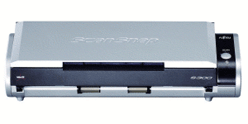
Fujitsu ScanSnap S300M Mac Document Scanner
The ScanSnap S300M is the world�s smallest duplex ADF scanner. It's designed to provide best-in-class performance inside or outside of the home or office for the Mac PC user. View PDF and JPEG files with the thumbnail viewer, Arrange files with simple drag and drop actions, Easily insert and delete images, Change thumbnail display sizes, Automatically create searchable PDF files, Quick drag and drop to e-mail or to a printer.Availability: Phased Out

Pay only P 1,600 a Month for 12 months.
Or pay only P 3,030 a Month for 6 months.
- Installment promo is available for locally issued credit cards
- Card holder must transact inside an Asianic store to avail of the installment
Features
The ScanSnap S300M PDF Scanner: Easy To Use One-Button Scanning!It’s easy to digitize documents with the ScanSnap S300M for Mac PC Just press the "SCAN" button and the duplex scanner quickly captures both sides of documents, presenting images as they are meant to be seen.With its built in automatic image correction features, the S300 ensures great scanning results.
Simply load a stack of documents into the hopper and press the "SCAN" button. The S300M automatically recognizes the size of each document, detects and corrects for skew, and shows images in their proper orientation with blank pages removed.
The S300 PDF Scanner Instantly Creates Searchable Content From Your Scans
The ScanSnap S300 automatically converts scanned data into searchable PDF files. Now you can quickly and easily locate your images and find information contained within your documents using keyword searches.
Compact Mobile Scanning Solutions
At half the size of other ScanSnap scanners, the S300M is designed to be the smallest Fujitsu ADF scanner. As a mobile alternative, the ScanSnap S300M is compact enough to carry around, and its desktop footprint is so small, you’ll never have to worry about finding a spot to put it.
Automatic Document Feeder Holds Up To 10 Sheets
The ScanSnap S300M PDF scanner features double-sided multi-sheet feeding. The automatic document feeder holds up to 10 sheets of paper , and the scanner scans images at up to 8 pages per minute.
The S300 Scanner Operates on USB Bus Power For Ultimate Portability
For added mobile convenience, the Fujitsu ScanSnap S300M can be powered though the PC’s USB port* when an AC power source is not available.
*When using the USB bus power cable, the PC must have two USB ports; one for power feeding and the other for USB cable connection.
Scans anything from thick business cards and postcards to legal size documents
In addition to automatically recognizing document size, the ScanSnap S300 de-skews images, removes blank pages and shows them in their proper orientation. The ScanSnap S300 is also able to scan business cards and postcards that are thicker than normal (Up to 56 lb.)
Efficiently Manage Business Cards and Contact Information with the S300M Scanner
The ScanSnap S300M is a business card scanner as well as a PDF scanner. Quickly scan business cards for fast and easy reference. Digitize both sides of a business card in a single pass. Information on the business card is captured by bundled CardMinder software and can be exported to Outlook, CSV (Excel), and other contact management systems.
Technical Specifications
| General Technical Specifications | ||
|---|---|---|
| Scanner Type | ADF (Automatic Document Feeder). Duplex color scanning | |
| Scanning Modes | Color / B&W / Automatic Color & B&W detection | |
| Image Sensor | CIS (Color Image Sensor) X 2 | |
| Light Source | 3 color LED (Red / Green / Blue) | |
| Optical Resolution | 600 dpi x 600 dpi | |
| Scanning Speed(1) (A4 portrait / AC adapter) | Normal mode | Color 150 dpi, B&W 300 dpi: 8 pages per minute / 16 images per minute |
| Better mode | Color 200 dpi, B&W 400 dpi: 6 pages per minute / 12 images per minute | |
| Best mode | Color 300 dpi, B&W 600 dpi: 4 pages per minute / 8 images per minute | |
| Excellent mode | Color 600 dpi, B&W 1,200 dpi: 0.5 pages per minute / 1 image per minute | |
| Scanning Speed (A4 portrait / USB bus power) | Normal mode | Color 150 dpi, B&W 300 dpi: 4 pages per minute / 8 images per minute |
| Better mode | Color 200 dpi, B&W 400 dpi: 3 pages per minute / 6 images per minute | |
| Best mode | Color 300 dpi, B&W 600 dpi: 2 pages per minute / 4 images per minute | |
| Excellent mode | Color 600 dpi, B&W 1,200 dpi: 0.5 pages per minute / 1 image per minute | |
| Scanning Range | A4, A5, A6, B5, B6, Business card, Letter, Legal and Custom sizes. Max: 8.5 X 14.17 in. (216 X 360mm), Min: 2 X 2 in. (50.8 X 50.8mm), Automatically recognizes document type by paper length. | |
| Paper Weight (Thickness) | 17 to 28 lb. (64 to 104.7 g/m²) | |
| Paper Chute Capacity | Maximum 10 sheets (A4 size at 20 lb. or 80 g/m²) | |
| Interface | USB 2.0 (USB 1.1 Compatible) | |
| Driver | ScanSnap specific driver (TWAIN/ISIS® not supported) | |
| Applications | ScanSnap Manager V4.2, ScanSnap Organizer V3.2, CardMinder™ V3.2 | |
| Included Items | USB cable, USB bus power cable, AC adapter, AC cable, Getting started guide and Setup CD-ROM | |
| Power Requirement | AC Adapter | AC 100V to 240V, 50 / 60 Hz |
| USB Bus Power | 5V / 1A (0.5A X 2 Port) | |
| Power Consumption | Operating: 9W or less Sleep mode: Less than 5W | |
| Operation Environment | Temperature | 41°F to 95°F (5°C to 35°C) |
| Relative humidity | 20 to 80% (non-condensing) | |
| Dimensions (W x D x H) | 11.18 in. x 3.74 in. x 3.03 in. (284mm x 95mm x 77mm) | |
| Device Weight | 3.08 lb. (1.4kg) without power adapter | |
| Environmental Compliance | ENERGY STAR® Compliant / RoHS | |
| Limited Warranty | 1 year Limited Warranty. | |
| OS Supported | Apple Mac OS | |