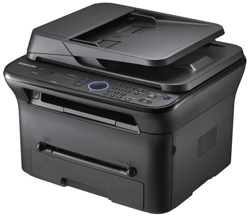
Home Printers & Scanners Laser All-In-Ones Samsung SCX-4623F Laser All-in-One with Fax printer
Sunday, 14 December 2025

Browse by Category

Samsung SCX-4623F Laser All-in-One with Fax printer

Samsung SCX-4623F Laser All-in-One with Fax printer
Print Resolution Up to 1200 x 1200dpi effective output, Speed (Mono) Up to 22ppm in A4 (23ppm in Letter), Resolution Up to 1200 x 1200dpi effective output. Scan Resolution (Optical) Up to 1200 x 1200dpi (Enhanced) Up to 4800 x 4800dpi. Fax Modem speed 33.6Kbps, Memory 4MB (225 pages), Resolution Up to 300 x 300dpi.

Availability:  Phased Out

0% Promo

Pay only P 1,999 a Month for 6 months.

Or pay only P 1,069 a Month for 12 months.

  • 0% interest promo is available for locally issued credit cards
  • Card holder must transact inside an Asianic store to avail of the 0% promo

Features

As aesthetically pleasing as it is efficiency-minded, the high performance SCX-4623FN definitely knows how to share. Its enhanced networking capabilities keep coworkers connected and even lets them share files. And though it’s connecting a high volume of users, its super-fast CPU ensures you’re never left waiting in a mind-numbing print queue. Even when it’s being used to fax, scan and copy – yes, it does all that as well.

It multi-tasks so you don’t have to. Capture what catches your eye

It multi-tasks so you don’t have to.

Productivity is key to running any office or professional workgroup. And the versatile SCX-4623FN was designed to deliver exactly that. Now you can print, copy, scan, fax and PC-fax with unparalleled convenience, ease and speed. Why cram a corner of your office with several different machines when all you need is one central device – the 5-in-1 SCX-4623FN laser multifunction printer.

Capture what catches your eye

Samsung’s AnyWeb Print software lets you go hunting and gathering on the Web. You can utilise the SCX-4623FN to easily select, drag and drop content from different web pages onto a printable scrap board in your browser window, all while you surf. It’s the easy way to collect, arrange and edit those useful reference points and resources you can only find on the Internet for that big project – or just for fun.

Connect with your colleagues

Connect with your colleagues
 
Connect everyone in your office to one network and keep everything running smoothly. They’ll share a common printer and you’ll save time from servicing multiple machines. And with the Ethernet interface you can increase your performance by hooking it up to the network with an existing cable. Improve your communication skills with the SCX-4623FN laser printer and keep your lines of communication open.

It turns your PC into a fax machine

It turns your PC into a fax machine Smart looking, smart acting.
 
From lunch specials to important documents, the SCX-4623FN makes sending and receiving faxes a cinch. It can deliver and save received fax data in a folder on your PC as well as change document files to image files so you can send faxes from your desk – saving toner, paper and energy. Now that’s efficiency.

Smart looking, smart acting.

Instead of the usual unsightly paper tray, the SCX-4623FN boasts an attractive enclosed paper feed system which protects paper from dust, keeps its interior clean and reduces the noise level. It also features a glossy, protective top, easy-to-reach power button and 250-sheet capacity. Gorgeous print-outs from a gorgeous machine!

Print it your way

Print it your way The printer that works with your budget.
 
Loaded with unique copy functions, the SCX-4623FN heightens both your creativity and productivity. You can divide your original into full-page portions to create a poster, save time and materials with 2-up and 4-up copying, produce many copies of an image on one page with clone copying, or print 2-sided business cards.

The printer that works with your budget.

The SCX-4623FN lets you choose the right consumables option which you can afford. Toner cartridges are available in cost-effective standard-yield 1,500-page versions, which save the home user money on the purchasing price.
Compass Navigation Toner Save Mode Fast CPU

Compass Navigation

Always know where your job stands with the SCX-4623FN’s navigation feedback LED pattern. It keeps you clued in with its 11 different job status indicators, including error and warning situations.

Toner Save Mode

Toner Save Mode lets you print using less toner on each page without compromising quality and extends the life of the toner cartridge than normal mode by up to 30%.

Fast CPU

With a 360MHz. processor, the SCX-4623FN works fast to reduce wait time from network printing and improve office productivity with its quick processing and rapid fire printing.


Technical Specifications

Overview Function Print, Copy, Scan, Fax
Print Resolution Up to 1200 x 1200dpi effective output
Emulation SPL (Samsung Printer Language)
First Print Out Time (Mono) Less than 9 seconds (From Ready Mode)
Duplex Manual
Speed (Mono) Up to 22ppm in A4 (23ppm in Letter)
Copy Resolution Up to 1200 x 1200dpi effective output
First Copy Out Time (Mono) Less than 12 seconds (Platen), Less than 14 seconds (ADF)
Zoom Rate 25 ~ 400%
Copy Features ID Copy, 2-up, 4-up, Poster Copy, Clone Copy, Collation Copy, Auto-fit
Speed Up to 22cpm in A4 (23cpm in Letter)
Multi Copy 1 ~ 99 pages
Scan Compatibility Method Colour CIS
Scan to o PC
Resolution (Optical) Up to 1200 x 1200dpi
Resolution (Enhanced) Up to 4800 x 4800dpi
Fax Compatibility ITU-T G3, ECM
Modem speed 33.6Kbps
Memory 4MB (225 pages)
Resolution Up to 300 x 300dpi
Auto Dial Speed dial 200 locations
Fax Feature Multi sending, Fax to PC / PC Fax, delayed fax
Paper Handling Input Capacity and Types 250-sheet Cassette Tray, 1-sheet Manual Tray
Output Capacity and Types 80-sheet Face Down, 1-sheet Face Up
Media Size A4, A5, A6, ISO B5, JIS B5, Executive, Letter, Oficio, Folio, Legal, Custom
Media Type Plain Paper, Transparency, Envelope, Labels, Card stock, Thick, Thin, Cotton, Colour, Pre-Printed, Recycled, Bond, Archive
ADF Capacity 40-sheet
ADF Document Size Width: 142 ~ 216mm (5.6" ~ 8.5") Length: 148 ~ 356 mm (5.8" ~ 14.0")
General LCD 2 line x 16 characters
Memory / Storage 64MB
OS Compatibility Windows 2000 / XP / Vista / 2003 Server / 2008 Server, Mac OS X 10.3 ~ 10.6, Various Linux OS
Interface High speed USB 2.0
Noise Level Less than 50dBA (Printing), Less than 50dBA (Planten Copying), Less than 52dBA (ADF Copying), Less than 26dBA (Standby)
Dimension (W x D x H) 416.0 x 415.4 x 318.9mm (16.4 x 16.1 x 12.6")
Weight 11.54Kg (25.40lb)
Duty Cycle, Monthly 12,000 pages
Consumables Yield Standard: Average Cartridge Yield 1,500 standard pages High yield: Average Cartridge Yield 2,500 standard pages (Ships with 1,000 pages Starter Toner Cartridge) Declared cartridge yield in accordance with ISO / IEC 19752
Type 1-piece Cartridge
Model Code